Scheduling Software for Medical Offices: What to Look For
Choosing the right scheduling software for medical office use can make a noticeable difference to the way a healthcare practice operates. From managing appointments and practitioner availability to reducing administrative work and improving patient communication, the right system can help create a smoother working day.
For South African medical practices, scheduling is about more than replacing a paper diary with a digital calendar. Modern healthcare practices need to coordinate practitioners, appointment types, patient information, reminders, cancellations and, in many cases, billing and clinical workflows too.
But with so many options available, what should you actually look for in scheduling software for a medical office?
Why Medical Office Scheduling Matters
Appointment scheduling might appear to be a simple administrative function, but it can influence almost every part of a practice.
A poorly managed diary can contribute to:
- Double bookings
- Long patient waiting times
- Reception bottlenecks
- Missed appointments
- Last-minute cancellations
- Overworked practitioners
- Empty appointment slots
- Repetitive administrative work
- Frustrated patients and staff
Efficient scheduling helps create a more predictable workflow.
When the right patient is booked with the right practitioner at the right time, reception staff have better visibility of the day, practitioners can prepare for consultations and patients know what to expect.
Scheduling isn’t simply about filling appointment slots. It’s about creating a workable flow throughout the medical office.
What Is Scheduling Software for Medical Offices?
Scheduling software for medical offices is a digital system designed to manage appointments, practitioner availability, patient bookings and related practice workflows.
A standard calendar can show that someone has an appointment at 10:00. Healthcare scheduling software needs to understand much more.
Depending on the platform, it may coordinate:
- Multiple practitioners
- Different consultation types
- Appointment durations
- Consulting rooms
- Equipment availability
- Recurring appointments
- Waiting lists
- Online bookings
- Telehealth appointments
- Patient communication
The most useful systems can connect scheduling with other areas of practice management.
For example, GoodX is an example of a South African medical practice-management solution where scheduling can form part of a broader connected workflow rather than functioning as a standalone calendar.
That distinction matters because the value of scheduling software often comes from how well it works with everything else your practice does.
1. Online Appointment Booking
One of the most useful features to look for is online appointment booking.
Traditionally, patients have had to phone a medical practice during office hours to make an appointment. For a busy practice, this can place considerable pressure on reception staff.
Online booking allows patients to view available appointments and make bookings themselves.
Depending on the system, patients may also be able to:
- Select an appointment time
- Choose a practitioner
- Book different consultation types
- Cancel appointments
- Reschedule appointments
This can reduce routine telephone traffic and allow receptionists to concentrate on patients who are physically at the practice or require direct assistance.
It can also make it possible for patients to book appointments outside traditional office hours.
For a modern medical office, 24/7 booking access can be more than a convenience—it can become an important part of the patient experience.
2. Automated Appointment Reminders
Even after a patient books an appointment, there is no guarantee they will remember it.
This is why automated appointment reminders are another important feature.
Scheduling software can automatically send appointment confirmations and reminders, reducing the amount of manual follow-up required from reception staff.
Depending on the system, communication options may include:
- SMS confirmations
- SMS reminders
- Email reminders
- WhatsApp messages
- Cancellation notifications
- Rescheduling instructions
- Follow-up communications
The first source we reviewed highlights the importance of mobile communication for South African practices and describes automated reminders as a way of reducing the administrative burden associated with appointment management.
The advantage is consistency. Once the reminder workflow has been configured, the system can handle routine messages automatically.
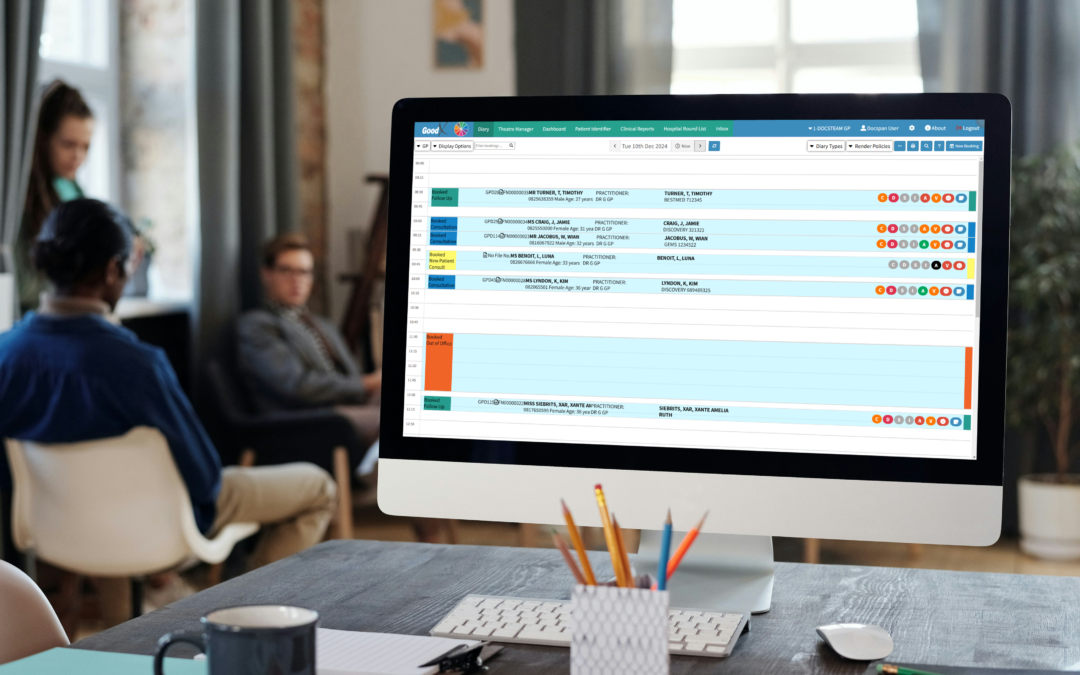
3. Multiple Practitioner Diaries
Scheduling becomes considerably more complicated when a medical office has several healthcare professionals.
A practice may have GPs, specialists, physiotherapists, dentists, nurses or other practitioners working from the same location.
The scheduling system should make it easy for reception staff to see multiple practitioner diaries without jumping between disconnected calendars.
Ideally, the system should account for:
- Each practitioner’s working hours
- Leave and unavailable periods
- Appointment types
- Consultation durations
- Room availability
- Other scheduling restrictions
This gives the practice a clearer view of its actual capacity.
A system such as GoodX can be considered when a practice wants scheduling to sit within a wider practice-management environment rather than relying on a separate consumer calendar application.
4. Custom Appointment Types and Durations
Not every patient visit requires the same amount of time.
An initial consultation may require more time than a routine follow-up. A procedure may require a particular room or equipment. A telehealth appointment may have different requirements again.
For this reason, good medical scheduling software should allow practices to configure different appointment types and durations.
Examples could include:
- Initial consultations
- Follow-up appointments
- Procedures
- Annual medicals
- Assessments
- Telehealth consultations
- Extended consultations
This helps create a more realistic diary.
Instead of treating every patient as a standard block of time, the practice can build appointment schedules around the actual requirements of different services.
5. Waiting List Management
Cancellations are an unavoidable part of running a medical practice.
The problem is what happens after someone cancels.
A previously occupied appointment slot can suddenly become empty, leaving the practice with unused capacity.
Waiting list management can help address this.
Patients who would prefer an earlier appointment can be placed on a waiting list. When a suitable slot becomes available, the practice can contact an appropriate patient rather than simply leaving the time unused.
This can help:
- Fill cancelled appointments
- Reduce patient waiting times
- Improve practitioner utilisation
- Give patients earlier access to care
For practices with high demand, this can make appointment management significantly more proactive.
6. Integrated Patient Records
A scheduling system becomes considerably more useful when appointments connect with patient information.
A basic calendar tells you when a patient is coming.
An integrated healthcare system can help provide context about who the patient is and what information may be relevant to their visit.
The second article we studied emphasises the importance of connecting scheduling with electronic health records and other practice-management functions.
This type of integration can reduce repetitive data entry and help practitioners prepare for consultations.
For example:
Patient books → appointment is recorded → patient information is linked → consultation takes place → clinical information is documented.
Rather than managing each stage in isolation, the workflow becomes more connected.
This is one area where an integrated platform such as GoodX can be relevant for South African practices evaluating scheduling as part of their broader practice-management needs.
7. Practice Management Integration
Perhaps one of the most important questions to ask when choosing scheduling software is:
Will it work with the systems my practice already uses?
A scheduling application that operates in isolation can create additional administration.
If staff have to enter the same appointment into two different systems, there is more opportunity for errors and duplication.
A connected approach can help information flow between scheduling and other practice functions.
The second source makes an important distinction here: the number of features a software provider lists is less important than how those features work together.
A system might advertise scheduling, billing, patient records and reminders. The real question is whether those functions operate as one connected workflow.
This is a useful consideration when evaluating GoodX or any other medical practice-management platform.
8. Mobile-Friendly Booking
Patients don’t always book appointments from a desktop computer.
They may be using a smartphone during a lunch break, in the evening or while travelling.
That makes mobile-friendly booking essential.
The booking process should be:
- Quick
- Easy to understand
- Simple to navigate
- Responsive on smartphones
- Clear about available appointments
A complicated online booking process can discourage patients from completing their appointment.
The goal is to remove friction—not introduce another digital hurdle.
9. Patient Self-Service
Another feature worth considering is patient self-service.
Patients shouldn’t necessarily need to phone reception every time they want to make a routine change to their appointment.
Depending on the platform, self-service functionality may allow patients to:
- Book appointments
- Confirm appointments
- Cancel appointments
- Reschedule appointments
- Complete forms before arriving
- Receive appointment information
This can reduce the number of routine calls reaching reception.
It also gives patients greater control over their healthcare interactions.
10. Reporting and Scheduling Analytics
Good scheduling software should help a practice understand how its appointment diary is performing.
Reporting and analytics can provide insight into:
- Appointment volumes
- Cancellation patterns
- No-show rates
- Practitioner utilisation
- Peak booking periods
- Available appointment capacity
This information can help practice managers identify patterns.
For example, if particular appointment types consistently require more time, the practice may need to adjust their durations. If cancellations frequently happen without sufficient notice, automated reminders may deserve closer attention.
The goal is to turn scheduling data into practical decisions.
11. POPIA and Patient Information
Medical practices work with sensitive personal information, so data protection needs to be considered when selecting healthcare technology.
South African practices should assess how a scheduling platform handles patient information and what measures are in place to support compliance with the Protection of Personal Information Act (POPIA).
Questions to ask include:
- How is patient information stored?
- Who has access to appointment information?
- How is information transmitted?
- What security controls are available?
- How are consent requirements handled?
- What happens to the data if the practice changes systems?
These questions should be part of the software-selection process from the beginning.
12. Look Beyond the Calendar
One of the biggest mistakes a practice can make is evaluating scheduling software as though it were simply a digital diary.
The appointment is only one stage in the patient journey.
A connected workflow might look something like:
Patient books → confirmation is sent → reminder is delivered → forms are completed → appointment appears in the practitioner’s diary → consultation takes place → clinical information is recorded → billing is completed → follow-up is scheduled.
When these stages work together, staff spend less time moving information between systems.
This is the fundamental difference between a basic appointment calendar and a broader healthcare practice-management platform.
The objective isn’t to buy the software with the most features. It’s to choose software where the right features work together.
Where Does GoodX Fit In?
For South African practices looking at scheduling software, GoodX is worth considering as an example of an integrated medical practice-management approach.
Rather than looking at appointment scheduling as an isolated function, GoodX brings scheduling into a wider practice-management environment.
That can be particularly relevant for practices that want their appointment management to work alongside other areas of the practice rather than adding another standalone application.
When evaluating GoodX—or any other solution—practices should consider the complete workflow:
How are appointments booked? How are reminders handled? How does scheduling connect to patient information? How does the system support practitioners and reception staff? And how much duplicate administration will remain?
Those questions are ultimately more useful than simply comparing feature lists.
How Scheduling Software Can Help Small South African Practices
Smaller practices often have fewer administrative resources, which means inefficient scheduling can have a noticeable impact.
If a receptionist spends a large portion of the day answering calls, manually confirming appointments and correcting diary problems, there is less time available for other administrative responsibilities and patient-facing tasks.
Online booking and automated reminders can help reduce some of that workload.
Better scheduling can also help practices make better use of the appointment capacity they already have.
The first source we reviewed describes how small practices can benefit from reduced administrative pressure, fewer booking errors, better patient communication and improved utilisation of appointment slots.
The important point is that efficiency shouldn’t simply mean squeezing more appointments into the day.
Good scheduling should help create a more organised and manageable practice.
How to Choose the Right Scheduling Software for Your Medical Office
Before choosing a platform, create a checklist based on the problems your practice actually experiences.
Does it offer online booking?
Patients should have a convenient way to make appointments without always needing to phone reception.
Can it send automated reminders?
Look for communication options that suit your patients and your practice workflow.
Can it manage multiple practitioners?
If several practitioners share the practice, their availability should be easy to manage from one system.
Can appointment durations be customised?
Different consultation types should be able to have different scheduling requirements.
Does it integrate with practice management?
Consider whether the scheduling function works with patient records, billing and other systems.
Can patients cancel or reschedule?
Self-service can reduce unnecessary telephone traffic.
Does it support waiting lists?
This can help practices respond to cancellations and use available appointment slots more effectively.
Does it provide useful reporting?
Scheduling data can reveal patterns that help practices make better operational decisions.
How does it handle patient information?
POPIA and data security should be considered before implementation, not afterwards.
Start With the Biggest Scheduling Problem
Your medical office doesn’t necessarily need to digitise every process at once.
A phased approach can make implementation easier.
Start with appointment scheduling and reminders.
Once those processes are working well, the practice can explore digital intake forms, patient portals, secure communication and other connected tools.
This allows the team to address the most immediate administrative problems first while building towards a more connected digital practice.
The important thing is to choose technology that can support the practice as its needs change.
The Bottom Line
Choosing scheduling software for medical office use is about much more than finding a replacement for a paper diary.
The right system should help manage appointments, practitioner availability, patient communication and administrative workflows while fitting naturally into the way the practice operates.
For South African medical offices, important features to consider include online booking, automated reminders, multiple practitioner diaries, custom appointment types, waiting lists, patient-record integration, mobile usability, reporting and POPIA considerations.
And when comparing solutions, don’t focus only on the number of features.
Consider how those features work together.
For practices looking for an integrated approach, GoodX provides an example of how scheduling can form part of a broader medical practice-management environment, rather than functioning as a disconnected calendar.
Ultimately, the best scheduling software is the system that solves the problems your team faces every day.
Less diary management. Less repetitive administration. Better visibility. A smoother experience for your patients and your practice team.
Before making a decision, map out your current appointment workflow and identify where your biggest problems occur. Then use those problems as your checklist when comparing scheduling solutions.
Because the right technology shouldn’t make your medical office more complicated.
It should make running it easier.
Contact our team to book your free GoodX demo.
Disclaimer: This article is provided for general informational and educational purposes only. While GoodX Software takes reasonable care to ensure that the information is accurate and current at the time of publication, laws, regulations, industry standards, healthcare policies and technology may change. The content should not be regarded as medical, legal, financial or other professional advice. Readers should verify information relevant to their circumstances and consult an appropriately qualified professional where necessary. GoodX Software accepts no responsibility for decisions made or actions taken solely on the basis of this content.